
Obtrusive JavaScript Checker 0.7 – support for JavaScript links, inline event information and summary report
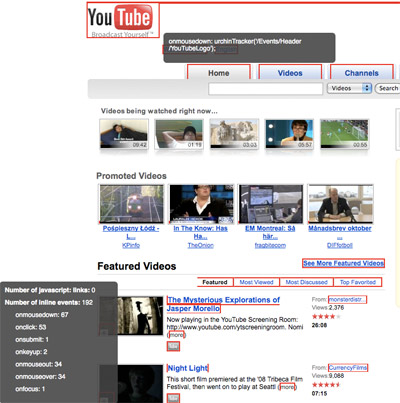
When I launched Obtrusive JavaScript Checker, I immediately felt it had more potential, and I definitely had more features to add to make it even more compelling. Therefore, here comes a new release with javascript: link support, detailed inline event information and a summary report.
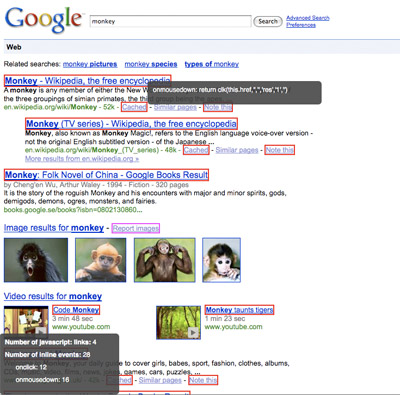
Support for javascript: links
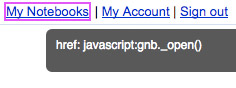
With this new release, support for javascript: links have been added, i.e. it also points those out and gives them a magenta border. Anyone using this practice should stop immediately, since it’s terrible, both for accessibility and SEO.
Detailed information
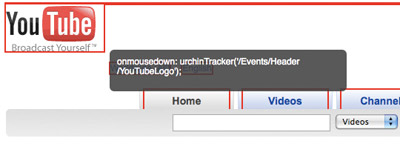
Now, when you hover over an element with an inline event, it will show you more information about it:
The same goes for javascript: links:
Summary report
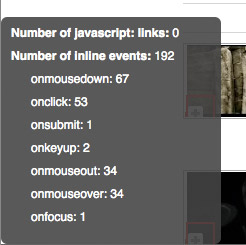
At the bottom left corner of the window, you will be presented with a summary report of the number of javascript: links and inline events in the current web page, and occurrences of each type of inline event summarized. It should be noted that it does this for each frame/iframe.
Downloads
- Download Obtrusive JavaScript Checker Greasemonkey user script
- Download Obtrusive JavaScript Checker Firefox extension
- install the Obtrusive JavaScript Checker command for Ubiquity
Updated November 3rd
Added a link to the newly released Obtrusive JavaScript Checker command for Ubiquity.
Wow, this is pretty cool. One question though, why <code>wrappedJSObject</code> property is used in the source?
Lim,
Yeah, it is, isn't it? 🙂
The <code>wrappedJSObject</code> is just something necessary for Greasemonkey-scripts to get a direct reference to a DOM element.
Robert,
Oh, that's weird. I was trying to make it into a bookmarklet just now, found JS errors from the <code>wrappedJSObject</code> property, removed them and it kind of work without them. 🙂
Nice tool Robert – detecting obtrusive fashions is really important and useful.
Which way is the recommended to use it as? As a greasemonkey script or as an extension?
Some thoughts: Would it be possible/desirable to do a version as a Ubuquity command and/or as a Firebug extension?
Great idea!
Lim,
Ah, I see. 🙂
I'd recommend the Greasemonkey approach instead of a bookmarklet, just for the sake of being able to customize domains etc.
Pelle,
Thanks!
I'd recommend Greasemonkey, since it's then very easy to enable/disable, and to customize for which domains it is being run.
As an Ubiquity command sounds interesting, I'll think about that! I've never developed a Firebug extension, so I'm not really sure what it takes, but it seems a lot easier for the developer to write Greasemonkey scripts rather than Firefox extensions in general.
Robert,
Ugh, I prefer the bookmarklet thing myself. It's a good alternative approach for non-GreaseMonkey setups or non-Firefox platforms. Anyway, I've made it for my own use. Thanks for the code 😀
Nice idea, works pretty cool here. A REST API for this would be cool, too. Maybe I'll have a go at that.
Lim,
I see. 🙂
Just bear in mind that the code won't work in IE, but otherwise you should be good to go in other web browsers.
Christian,
Thanks! A REST API complement sounds good, just let me know if you do anything cool with it. 🙂
[…] the latest release of Obtrusive JavaScript Checker and its cool information and report features, I got the request to make it as a command for […]
Hi,
thanks for sharing.
I installed it on Firefox and I am wondering where I can turn it on and off. It does not appear under add-ons or anywhere else.
Thanks,
Florian
Florian,
Thanks!
The Firefox extension can be found in the add-ons menu, amongst the other add-ons you have installed. Personally, I'd recommend the Greasemonkey script, since it allows enabling/disabling it without restarting the web browser, and also the possibility to customize it per different domains.
Curious, is it possible to have the window that sits in the bottom left ("Number of javascript links: … Number of inline events: …") act as position: fixed instead of absolute? If it's stuck in front of a link or other element on the page, you can't get to it without turning off the script and refreshing.
Other than that, I think this is a really cool little script!
HB,
Great idea! I've added in the code, it will be in the next release!
[…] down the path of providing developers good tools, Robert Nyman of DOMAssistant fame has updated his Obtrusive JavaScript Checker. The tool comes in a couple of different forms including a GreaseMonkey script, a Firefox add-on […]
What tehnique do you recommend to be used instead of javascript: links?
Ionut,
Have the link point to a proper URL, ensuring it works as a regular link should (making it accessible for people with JavaScript disabled, for various reasons).
Then enhance the user experience by adding an <code>onclick</code> event to the link from JavaScript in an external JavaScript file, preventing the default link action, and instead have it perform your desired JavaScript code.
[…] Full Article […]
[…] leave a comment » Day after day, you should realize how important to build unobtrusive JavaScript code. Embracing this concept lets you ensure better code and extremely easier code structure. This is why we are happy to talk here about Robert Nyman who has updated his Obtrusive JavaScript Checker. […]
[…] Obtrusive JavaScript Checker 0.7 – support for JavaScript links, inline event information and summary report […]
[…] Obtrusive JavaScript Checker 0.7 Quote: support for JavaScript links, inline event information and summary report […]
[…] la página de su autor podemos ver su funcionamiento, asà como otros soportes de descargas, como en script para […]
[…] Extensión de firefox para comprobar javascript intrusivo por Robert Nyman […]
[…] Extensión de firefox para comprobar javascript intrusivo por Robert Nyman […]