
Inline Code Finder Firefox extension – find inline JavaScript events, inline styling and javascript:links
When I first coded and released Obtrusive JavaScript Checker, I had some more ideas with it, as well as some great feedback I have received and wanted to see to. The result is Inline Code Finder, which looks for inline styling as well as what the Obtrusive JavaScript Checker offered, and it comes in two versions!
Description
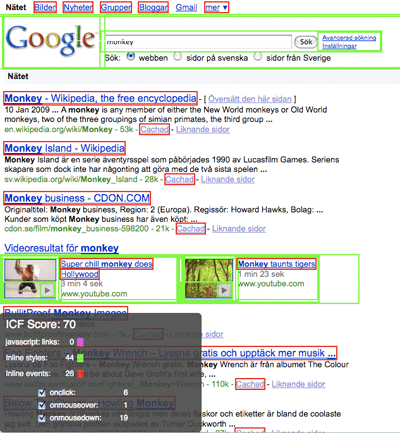
Just as Firebug has made my development life a lot easier, I want to offer the most simple way to find inline code which doesn’t meet the principles of separation between content (HTML), presentation (CSS) and interaction (JavaScript). Inline Code Finder looks through all HTML elements for any of these:
- Inline JavaScript events
- Inline style
javascript:links
Detailed information
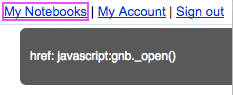
When you hover over an element with an inline event, inline styling or a javascript: link, it will show you more information about it:
Inline event information
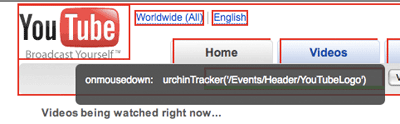
Inline style information

javascript: link linformation
Inline Code Finder versions
Following a lot of suggestions, Inline Code Finder is available both as a stand-alone version and as an add-on to the excellent Firebug. This means that for all of you who wanted it integrated into your regular workflow with Firebug have a new tab for Inline Code Finder.
The stand-alone version shows up in the status bar of your web browser window, while the Firebug version integrates into the existing Firebug installation and is offered as another panel, with its own command buttons and settings.
Stand-alone version
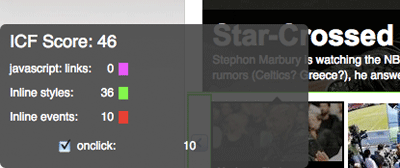
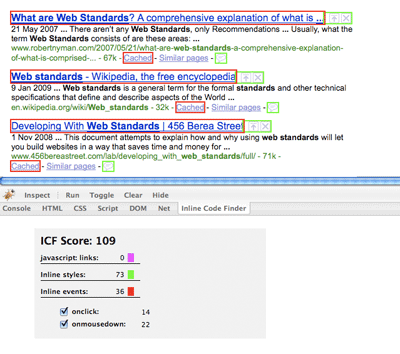
At the bottom left corner of the window, you will be presented with a summary report of the number of javascript: links, inline styles and inline events in the current web page, and each type of inline event summarized.

Firebug add-on
Shows as a separate Firebug panel with a summary, functions and options.
Settings
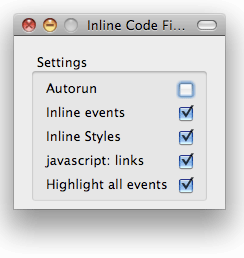
Since the aim of this tool is to be of interest to both JavaScript and/or CSS developers, you can set your own preferences with what to check for – just check the applicable items. There’s also an Autorun option if you want it to happen automatically for every page you enter.
Stand-alone version
Find your settings through Tools > Add-ons, choose Inline Code Finder and click Preferences.
Firebug add-on
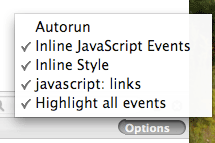
Click Options in the Inline Code Finder panel for Firebug, and you will be able to choose what to check for.
Keyboard shortcuts
To be able to work with this tool, it supports a keyboard shortcut to swiftly toggle on and off the Inline Code finder: Cmd + Shift + Option + I (Mac) and Ctrl + Shift + Alt + I (windows).

Downloads
Use it now – test your score!
So now you know what I will definitely check for if you ask me to review a web site. Inline Code Finder also offers a total ICF Score, which is meant to be of some guiding to how many things you need to take care of in the code, and the overall code quality and level of separation.
What’s your ICF Score? 🙂
Thanks for the great plugin. One problem that I’m not sure you caused, but only started happening when I installed the firebug plugin: every time I refresh the page and Firebug is open it switches to the Inline Code Finder. Do you know of any way of stopping that behavior?
Du rockar fan fett! 😀
(You fucking rule!)
Wes,
Thank you! Actually, that is my fault. I’ve solved the issue, and it will be pushed out in a new release, coming very soon! Therefore, anyone, just install the current version, and that specific issue will be gone in no time.
Anders,
Thanks a lot! 😀
Thanks Robert, another great tool! Good work!
Really nice work Robert!
Thanks!
Joakim, Marcus,
Thank you!
Ok, just wanted to say that a new version has been released of the Firebug version, addressing the above-mentioned issue. In Firefox, go to Tools > Add-ons and click Find updates.
Alternatively, you can download the new version directly from https://addons.mozilla.org/en-US/firefox/addon/9641
Thanks Robert for this addon! Works smoothly, and my — what site’s sitebuilder I’m — has ICF Score: 1. As a Firebug plugin, like YSlow — where livesex.com passes with a Score: 89 (because of a lack of CDN) –, improves my work, and my works quality.
Thanks again Robert!
Best regards,
Adam
Adam,
Glad that you like it!
For anyone else: Adam’s web site isn’t exactly child-friendly, as you might have already guessed (just so you know what happens if you click on his name).
uups, sorry! If you feel, please, remove my site’s url from my comments!
[…] For more details or to provide feedback, go to Robert’s post Inline Code Finder Firefox Extension – Find Inline JavaScript Events, Inline Styling And Javascript:…. […]
Excellent tool Robert!!! I especially like the Firebug version. A great way to integrate new tools into an established work flow.
After a decade and a half there still is room for improvement concerning web coding practices and tools. This is one idea that makes me wonder why on earth nobody thought of it before. It’s so devilish simple… but it’s also simple to comment on something afterwards 😀
On the other hand, for people who scrupulously followed the separation rules there never was any need for this. Guess that’s why nobody bothered.
Anyway, ICF is a keeper for me. If only to know what I’m up against when I get a ‘redesign these pages’ task. If you have any more ideas like this, Robert, do NOT hesitate to work them out 🙂
[…] way of identifying the kind of code that should always be avoided. More details can be found at Robert’s site. Plugins are available as standalone Firefox and Firebug […]
Stefan,
Thank you very much! 🙂
Of course I have a score of 0 on my own pages 😛
However, as such a cruel critic of code, whose first thing to do when visiting a new website is to detach stylesheets, then look at source, and finally read actual content, I couldn’t have a better tool than this beside the Tidy extension, to measure the quality of a site just in a fraction of seconds 👿
And that smiley was meant to be an evil laughter not an angry one…
Keep up coding such handy tools!
Ceriak,
Glad that you like it. And yes, sometimes it’s just too easy to find problems with someone else’s web site. 🙂
[…] Inline Code Finder Firefox extension – find inline JavaScript events, inline styling and javascript:… Awesome. […]
[…] myself as well as a lot of other developers out, I put a lot of effort into Inline Code Finder (Inline Code Finder release post), and released it at the end of the year. Available downloads […]
Hey Robert,
Very nice and useful plugin! I noticed an issue though. When there's a link that contains both href="javascript: and ALSO an event such as onclick="… it only shows the href when mousing over. Is it possible to show both?
Marco,
Thank you!
Interesting that you bring that up, I'll take a look at it!
[…] way of identifying the kind of code that should always be avoided. More details can be found at Robert’s site. Plugins are available as standalone Firefox and Firebug […]
Your tool doesn’t work for me on Firebug. It does nothing.
It doesn’t appear to do anything. Using FF 33.0.3, FB 2.0.6. I see nothing at all in the ICF tab in FB. All boxes are checked in the dropdown. Any ideas?
Yeah, you’re right, it seems to have stopped working. Not sure exactly why that is, haven’t updated it in years. For now, if you need that functionality, i recommend the standalone version of Inline Code Finder – just tried it and it works.
Thanks kindly. Much appreciated.