
Inline Code Finder
Inline Code Finder is a tool to traverse through all elements in a web page, and when it finds a HTML element with any of these, it will highlight them:
- Inline JavaScript events
- Inline style
javascript:links
In terms of inline events and javascript: links, it is generally frowned upon, and should instead be implemented in an unobtrusive fashion.
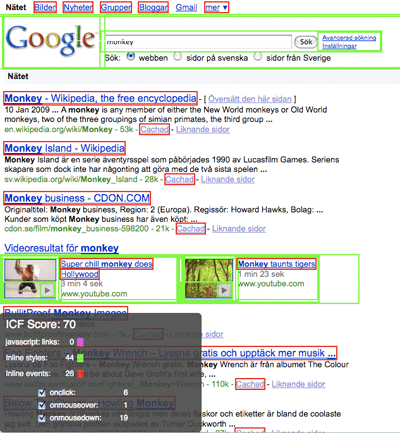
More information and a summary report
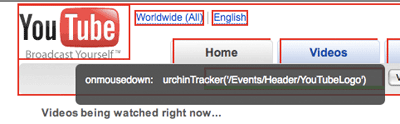
When you hover over an element with an inline event, inline styling or a javascript: link, it will show you more information about it:
Inline event information
Inline style information

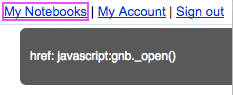
javascript: link linformation
Stand-alone version
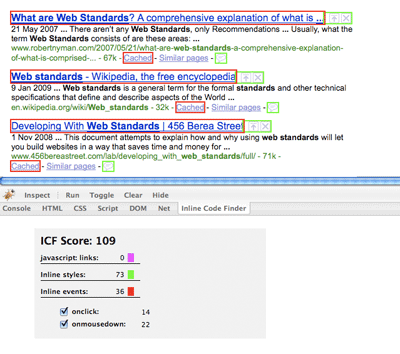
At the bottom left corner of the window, you will be presented with a summary report of the number of javascript: links, inline styles and inline events in the current web page, and each type of inline event summarized.

Firebug add-on
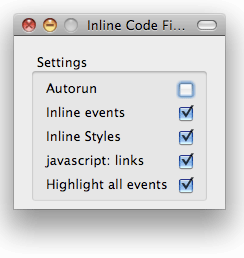
Settings
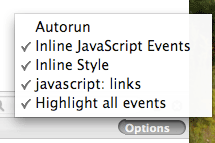
Naturally, since this tool sets out to be of interest to both JavaScript and/or CSS developers, you can set your own preferences with what to check for:
Stand-alone version
Firebug add-on
Keyboard shortcuts
To be able to work with this tool, it supports a keyboard shortcut to swiftly toggle on and off the Inline Code finder: Cmd + Shift + Option + I (Mac) and Ctrl + Shift + Alt + I (windows).

Availability
It is available as a stand-alone Firefox extension, stand-alone Google Chrome extension or as a Firebug add-on. The stand-alone version shows up in the status bar of your web browser window, while the Firebug version integrates into the existing Firebug installation and is offered as another panel, with its own command buttons and settings.
Stand-alone version (Firefox)

Firebug add-on
[…] ideas with it, as well as some great feedback I have received and wanted to see to. The result is Inline Code Finder, which looks for inline styling as well as what the Obtrusive JavaScript Checker offered, and it […]
[…] http://www.robertnyman.com/inline-code-finder/ […]
[…] inline events and JavaScript, so now he has extended the Obtrusive JavaScript Checker and created Inline Code Finder. Instead of just looking at JavaScript-related things, Inline Code Finder will find and highlight […]
[…] soon). Trying to help myself as well as a lot of other developers out, I put a lot of effort into Inline Code Finder (Inline Code Finder release post), and released it at the end of the year. Available downloads […]
[…] Nyman released a new version of his Inline Code Finder Firefox extension—which now handles inline CSS as well as […]
[…] have just released a new version of my Firefox extension Inline Code Finder nad made a personal download […]
[…] ??????Inline Code Finder??????Robert […]
[…] 5. Inline Code Finder […]
[…] 5. Inline Code Finder […]
[…] 5. Inline Code Finder […]
[…] 5. Inline Code Finder […]
[…] 5. Inline Code Finder […]
[…] 5. Inline Code Finder […]
[…] 5. Inline Code Finder […]
[…] sur le site et ainsi de vérifier si le résultat produit (HTML/CSSà est conforme à la maquette. Inline Code Finder affiche des informations utiles d’une manière agréable (tel que le style ou le code javascript […]
[…] sur le site et ainsi de vérifier si le résultat produit (HTML/CSSà est conforme à la maquette. Inline Code Finder affiche des informations utiles d’une manière agréable (tel que le style ou le code javascript […]
[…] 5. Inline Code Finder […]
[…] 5. Inline Code Finder […]
[…] 5. Inline Code Finder […]
[…] 5. Inline Code Finder […]
[…] to find undesired inline styles, inline JavaScript events and javascript: links, I believe, is my Inline Code Finder extension and now it’s available for Google Chrome as […]
[…] 5. Inline Code Finder […]
[…] 5. Inline Code Finder […]
[…] Inline Code Finder […]
[…] Inline Code Finder […]
[…] Inline Code Finder […]
[…] Inline Code Finder […]
[…] Inline Code Finder […]
[…] Inline Code Finder […]
[…] Inline Code Finder […]
[…] Inline Code Finder […]
[…] Inline Code Finder […]
[…] Inline Code Finder […]
[…] 5. Inline Code Finder […]
[…] Inline Code Finder […]
[…] different for a change. Modern browsers such as Chrome, Firefox, Safari or Opera are recommended.Inline Code FinderInline Code Finder is a tool to traverse through all elements in a web page, and when it finds a […]
[…] Inline Code FinderInline Code Finder is a tool to traverse through all elements in a web page, and when it finds a HTML element with any of these, it will highlight them. It finds inline JavaScript events, inline CSS coding and javascript:-links. […]
[…] Inline Code FinderInline Code Finder is a tool to traverse through all elements in a web page, and when it finds a HTML element with any of these, it will highlight them. It finds inline JavaScript events, inline CSS coding and javascript:-links. […]
[…] Inline Code Finder Inline Code Finder is a tool to traverse through all elements in a web page, and when it finds a HTML element with any of these, it will highlight them. It finds inline JavaScript events, inline CSS coding andjavascript:-links. […]
[…] Inline Code Finder Inline Code Finder is a tool to traverse through all elements in a web page, and when it finds a HTML element with any of these, it will highlight them. It finds inline JavaScript events, inline CSS coding and javascript:-links. […]
[…] Inline Code FinderInline Code Finder is a tool to traverse through all elements in a web page, and when it finds a HTML element with any of these, it will highlight them. It finds inline JavaScript events, inline CSS coding and javascript:-links. […]
[…] Inline Code Finder Firebug eklentisi de mevcut olan, web elemanlar?n? bulmaya ve javascript olaylar?n? yönetmeye yarayan browser eklentisi […]
[…] Inline Code Finder […]
[…] to develop and analyze web pages, I previously released two extensions for Firebug: Firefinder and Inline Code Finder. I’m happy say they are now updated and are working with the latest versions of Firefox and […]
[…] 5. Inline Code Finder […]
[…] Naturally, since this tool sets out to be of interest to both JavaScript and/or CSS developers, you can set your own preferences with what to check for: Settings Inline Code Finder – Robert's talk […]
[…] Inline Code Finder […]
[…] Inline Code Finder […]
[…] 5. Inline Code Finder […]
[…] 9- Inline Code Finder […]
[…] ?- Inline Code Finder […]
[…] ?- Inline Code Finder […]
[…] 9- Inline Code Finder […]