
Firefinder
What is it?
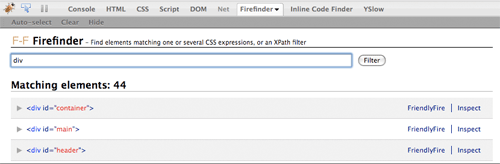
Firefinder is an extension to Firebug (in Firefox) and offers the functionality to, in a quick way, find HTML elements matching chosen CSS selector(s) or XPath expression. It allows you to instantly test your CSS selectors in the page while seeing the content at the same time, and matching elements will be highlighted.
Additionally, you can auto-select elements when hovering or via the context menu.
Code collaboration with the FriendlyFire feature
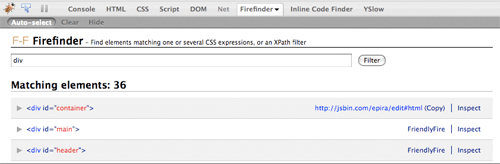
The best and most efficient way to share code with a friend or colleague is through a pastebin. Firefinder via its FriendlyFire feature offers you to swiftly share your code by clicking the FriendlyFire link for a matching element.
Its code will then be sent to the JS Bin pastebin, and Firefinder will present the public URL to it and a way to quickly copy it.

Inspect element
Per matching HTML element, you can click the Inspect link to immediately be taken to the corresponding element in Firebug’s HTML tab.
Matching elements and highlight
Firefinder offers you a count of how many matches there are – good for checking, for instance, the number of heading elements – and it also lists all the matching in a collapsible list in the Firefinder panel in Firebug. When you hover each item in that list, the corresponding element in the web page will be highlighted so you see which one it is.
How to use it
If you are in a web page and want to quickly use Firefinder, just press Ctrl + Shift + V on PC/Linux, Command + Shift + V on Macs, and the Firefinder panel will become visible and you can type away immediately.
Another option is naturally to first open up Firebug and then click the Firefinder panel.
Demo video
Below is a demo video of using Firefinder and the FriendlyFire feature:
Download
Download Firefinder for Firebug and get started!
Discussion/support
Have any problems, questions or suggestions? Visit the Firefinder Google discussion group.
[…] I am very happy to say that an idea I’ve had for a while has finally been implemented: Firefinder for Firebug. […]
[…] xpath Siguen apareciendo extensiones para Firebug. La última que he encontrado se llama Firefinder y ofrece la posibilidad de acceder directamente a elementos HTML a partir de selectores CSS o […]
[…] ne Erweiterung zu Firebug und vielleicht alle die nicht grosse Add-Ons benutzen wollen, geeignet. Firefinder is an extension to Firebug (in Firefox) and offers the functionality to, in a quick way, find HTML […]
[…] Robert Nyman has come up with a really nice addition to the list — Firefinder for Firebug. […]
[…] 5. Firefinder??Firebug?????selector?xpath?????? http://robertnyman.com/firefinder/ ??????(5.22) 1. YUI 3.x??????? http://hikejun.com/blog/?p=6 2. […]
[…] FireFind – FireFind does only one thing but it does it well: finding elements. Using a CSS selector or XPath […]
[…] my I think I like FireFinder for FireBug http://robertnyman.com/firefinder/ […]
[…] Firefinder: http://robertnyman.com/firefinder/ […]
[…] in inspector. To that end, I’ve recently come across two add-ons for Firebug.The first, Firefinder, is a handy tool to “find HTML elements matching chosen CSS selector(s) or […]
[…] CodeBurner Firebug plug-in. It’s a great little reference for HTML and CSS. And Robert Nyman’s FireFinder for Firebug is handy search for […]
[…] Firefinder […]
[…] Firefinder […]
[…] link […]
[…] Firefinder […]
[…] 10. Firefinder […]
[…] 10. Firefinder […]
[…] 10. Firefinder […]
[…] 10. Firefinder […]
[…] 10. Firefinder […]
[…] 10. Firefinder […]
[…] 10. Firefinder […]
[…] 10. Firefinder […]
[…] 10. Firefinder […]