
Geolocation in web browsers to find location & Google Maps examples
More and more services around us focus on where we physically are located at the moment, and how we can be assisted in the best fashion depending on that. Today I’d like to introduce the geolocation possibilities we developers have, and also play around a little with Google maps.
Introducing geolocation
Geolocation, i.e. finding out where someone is located, is extremely simple for a web developer. This is the code to accomplish that:
	// Check for geolocation support
	if (navigator.geolocation) {
		// Use method getCurrentPosition to get coordinates
		navigator.geolocation.getCurrentPosition(function (position) {
			// Access them accordingly
			alert(position.coords.latitude + ", " + position.coords.longitude);
		});
	}
That’s it! Pretty simple, right?
What happens when you utilize this code is that the web browser will show a notification to the end user, ask them if they want to share their location or not, and offer them an option to remember that choice for future preference. In Firefox, it looks like this:

Web browser support
- Firefox 3.5+
- Firefox on Mobile (aka Fennec)
- Safari on the iPhone (not the desktop)
- Android web browser
It should also be noted that at the time of writing, a beta of Google Chrome supports it, and I feel certain the other web browser vendors will shortly follow suit.
Not a part of HTML5
Even though it is bundled with other features, let’s just clear out a common misunderstanding: geolocation is not a part of the HTML5 specification, but rather comes from the Geolocation API Specification. Not that it really matters, though. Geolocation is new, cool and very useful, and if you want to bundle it with HTML5 when you talk about (just like most people did using the word AJAX to sell any sort of JavaScripting), be my guest.
Using geolocation and showing current location
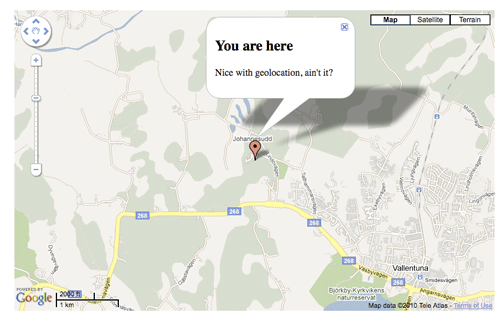
So, naturally, with this newfound knowledge, we want to utilize it with Google Maps and offer users an option to see where they are located on a map. The code to do this (with fallbacks if the user declines, or has a web browser that doesn’t support geolocation) looks like this:
HTML
<div id="map"></div>
JavaScript
	/*
		A Google Maps API key can be attained at
		http://code.google.com/apis/maps/signup.html
	*/
	<script src="http://www.google.com/jsapi?key=[Your Google Maps API key]"></script>
	<script>
		(function () {
			google.load("maps", "2");
			google.setOnLoadCallback(function () {
				// Create map
				var map = new google.maps.Map2(document.getElementById("map")),
					markerText = "<h2>You are here</h2><p>Nice with geolocation, ain't it?</p>",
					markOutLocation = function (lat, long) {
						var latLong = new google.maps.LatLng(lat, long),
							marker = new google.maps.Marker(latLong);
						map.setCenter(latLong, 13);
						map.addOverlay(marker);
						marker.openInfoWindow(markerText);
						google.maps.Event.addListener(marker, "click", function () {
							marker.openInfoWindow(markerText);
						});
					};
					map.setUIToDefault();

				// Check for geolocation support
				if (navigator.geolocation) {
					// Get current position
					navigator.geolocation.getCurrentPosition(function (position) {
							// Success!
							markOutLocation(position.coords.latitude, position.coords.longitude);
						},
						function () {
							// Gelocation fallback: Defaults to Stockholm, Sweden
							markerText = "<p>Please accept geolocation for me to be able to find you. <br>I've put you in Stockholm for now.</p>";
							markOutLocation(59.3325215, 18.0643818);
						}
					);
				}
				else {
					// No geolocation fallback: Defaults to Eeaster Island, Chile
					markerText = "<p>No location support. Try Easter Island for now.</p>";
					markOutLocation(-27.121192, -109.366424);
				}
			});
		})();
	</script>
You can see this example in action an try it out at https://robertnyman.com/html5/geolocation/current-location.html.
Using geolocation and showing travel route and directions
Google are working on Google Maps JavaScript API V3, which is available as a Labs project. The cool thing about this, apart from very good performance, is the option to show routes between two points, and also displaying a list of directions.
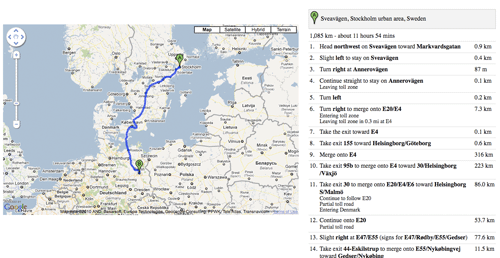
They way to do that looks like this in code (like above examples, contains fallbacks):
HTML
	<div id="map"></div>
	<div id="map-directions"></div>
	<script type="text/javascript" src="http://maps.google.se/maps/api/js?sensor=false"></script>
	<script>
		(function () {
			var directionsService = new google.maps.DirectionsService(),
				directionsDisplay = new google.maps.DirectionsRenderer(),
				createMap = function (start) {
					var travel = {
							origin : (start.coords)? new google.maps.LatLng(start.lat, start.lng) : start.address,
							destination : "Alexanderplatz, Berlin",
							travelMode : google.maps.DirectionsTravelMode.DRIVING
							// Exchanging DRIVING to WALKING above can prove quite amusing :-)
						},
						mapOptions = {
							zoom: 10,
							// Default view: downtown Stockholm
							center : new google.maps.LatLng(59.3325215, 18.0643818),
							mapTypeId: google.maps.MapTypeId.ROADMAP
						};

					map = new google.maps.Map(document.getElementById("map"), mapOptions);
					directionsDisplay.setMap(map);
					directionsDisplay.setPanel(document.getElementById("map-directions"));
					directionsService.route(travel, function(result, status) {
						if (status === google.maps.DirectionsStatus.OK) {
							directionsDisplay.setDirections(result);
						}
					});
				};

				// Check for geolocation support
				if (navigator.geolocation) {
					navigator.geolocation.getCurrentPosition(function (position) {
							// Success!
							createMap({
								coords : true,
								lat : position.coords.latitude,
								lng : position.coords.longitude
							});
						},
						function () {
							// Gelocation fallback: Defaults to Stockholm, Sweden
							createMap({
								coords : false,
								address : "Sveavägen, Stockholm"
							});
						}
					);
				}
				else {
					// No geolocation fallback: Defaults to Lisbon, Portugal
					createMap({
						coords : false,
						address : "Lisbon, Portugal"
					});
				}
		})();
	</script>
This example is also available for viewing at https://robertnyman.com/html5/geolocation/current-location-and-directions.html
Maps are cool
I’ve always found maps very cool, and with all this new geolocation support, we can create some awesome services. Start playing with it now. 🙂
Maps are fun indeed. I did recently some OpenLayers which allows you to integrate tons of different map types (also Google Maps) with one interface. The documentation could be better but it's definitly worth a look if you like maps.
Chris,
Nice, thanks for the tip!
[…] Geolocation in web browsers to find location & Google Maps examples […]
Chrome Dev Channel supports Geolocation with the –enable-geolocation switch. Just tested on Mac and works. Opera 10.5 betas and RCs had geolocation enabled however it looks like it has been turned off in the Windows release and on Unix and Mac.
Michael,
Right, I touched on Google Chrome in the post. I've tested the dev release, and it seemed to work fine; however, I never got the option whether a web page should remember my choice or not, it just automatically remembered. It's interesting that Opera decided to take it out for the moment, though.
Thanks for this! Awesome stuff
Jernej,
Thanks!
Great article. Indeed geolocation is a hot topic these days. Got to keep a close eye on new implementations and updates to the API.
[…] Geolocation has feel to it.Looking for the techy explaination of geolocation? Have a look at Robert Nyman’s writeup. June 18th, 2011 by Emil Stenström Tags: Geolocation, Google, Google Maps Posted in JS, Modern web […]
Quick question, when I decide not to share my GeoLocation, shouldn’t the default map load up (the map of the earth)? and not just show a screen with no map? j/w
Thanx
Jay,
You could absolutely do that, but the example isn’t implemented in that way.
the page i want to use is (http://code.google.com/apis/ajax/playground/?exp=localsearch#localsearch_with_markers)
Now what my questions are, first I would want the map to first load up with the user’s current location (with a customer marker which will stay in place no matter where the user drag the map to) and then show the restaurant near the current location.
And also to display the search query and results on a different part of the page rather then below the map.
How would I go on doing that?
Thanks so much for your help!
Hasan,
I believe it’s best to ask that question in the Google Maps Forum.
Tried but unfortunately theres no response, and i have been waiting for a week now!
Hasan,
Sorry about that. All I can say is try again, and Google around to see if other people have done similar things.
well, i am amazed that no one still has discussed aboout geoloations in IE. Mr. Bill Gates IE has a problem with IE. there is no support.
everytime it goes to else loop.
anyone knows anything about this ?
Thanks in advance !
Anil,
Geolocation has been supported since IE9 and up.
Thanks for this. It works great in my browsers. However, it doesn’t seem to work on an iPhone (or the iOS simulator). It asks for my location (which I allow), but then goes to an address in San Fransicso. I live in Indianapolis, IN. Any thoughts?
alamo1978,
Sorry, no idea. It definitely supports it, so it might be depending on re-routing of your data connection.
Hello !
I’m trying to see the map from the second link but nothing appears here. I’m using the last FF version. Is this occouring only here ?
Thank you !
Thiago,
The web browser will ask you if you want to share your location. You have to say yes to see the map and the directions.
i need to place google map(http://maps.google.co.in/maps?&saddr=pune&daddr=bangalore“) with in div tag or iframe
code is as belove
but i am not getting this ..
is there any idea to do this..
My final theam is i want palce google map(http://maps.google.co.in/maps?&saddr=pune&daddr=bangalore) in small arear of browser that it..
pls let me know any solution..
Rangappa,
Please look in the demo page for how to implement it.
Hi, is it possible to use geolocation to display the website users current location as text? So for example, in ghe top corner i want “your current location is: ‘location’ “. Ideally then i will only display content related to that location.
Thanks
Paul,
Then you need to use Google Maps, map the name of the location to the name, and display it. Please read the Google Maps docs for that.
How to get destination using origin and distance in miles.
Is there any way to do so ?
Nidhi,
You need to check with the Google Maps API for the things you can do.
HI Robert, can you input a location ie for a shop and for the user to activate there location so the can have a route to the shops location?
Cheer,
Patrick
Yes, definitely. As shown above, just have the name/address or similar for the shop in your script.
Well I have a problem with Geolocation, when the page is initialized I have “right” location, after I refresh the page there are different location, maybe 10 meters from first. After one more refresh I have a third location, etc.. I tested on this link here , and again I don’t have a right position.
Colin,
Geolocation is quite tricky, implementation- and experiencewise, and the result could vary a lot depending on a huge number of factors.
hai,
sometimes Geo-location failed to retrieve correct location..
I am building small application to get current location details which can installed in mobile.I am using Geo-Location to get current location details.Even-though mobile is in same place for particular duration,geo-location getting different address,latitude,longitude.It doesn’t getting accurate location details.
Dear Robert,
I’m Luis, I’m starting developing in Android, and I need some help.
I need to do an application in android where I can get through the GPS location all the trades with some published offer.
I’m lloking into the LBS services of Android, but there is nothing about to search offers in a google map.
How can I do that ? do you know which source code could I use ?
many thanks in advance!
Kindest regards,
Luis
Luis,
This post is about geolocation with web technologies, not in Android apps. I recommend checking the Android documentation for that.
Dear Robert,
many thanks for your hint!
have a good day!
Kindest regards,
Luis
thank you so much
how to destination coordinate
What is the license for this code?
While seeing my position on a map is an obvious usage of geolocation, I am more interested in determining my location and then using that location in HTTP requests to Google for search results tailored to my location. Do you have any example code for that?
With Google, if you access it on mobile or desktop, it will adapt results based on your location. E.g. if you try it on mobile it will ask for your location.