
Firefox 3.5 is released – information about having multiple Firefox versions and web developer extension compatibility
Firefox 3.5 was released yesterday, and it has already reached 5 and a half million of downloads (at the time of writing). Therefore, I thought I’d answer some common questions, especially from a web developer perspective about the new version and which web developer extensions which will work with it.
I have to say that I think Firefox 3.5 is an impressive release, it has gotten even better in so many areas! One very important thing is speed: according to performance God Steve Souders, Firefox 3.5 is the best-performing web browser, followed by Chrome 2, Safari 4, IE 8 and Opera 10.
Don’t throw Firefox 3.0 out – run multiple versions of Firefox side-by-side instead
Even though you’re probably super-eager to replace all old versions of Firefox on your machine, please know that it is completely possible (and very simple) to have multiple installations of Firefox side-by-side; and, have them all running at the same time too, if you want to!
You can download any number of versions of Firefox, and then just install it into different catalogs, or just give each installation a unique name (preferably version number). This is very useful, especially if you are a web developer, to quickly test something in a number of versions of Firefox.
Creating different Firefox profiles
Then, naturally, you might want to have different settings, extensions etc installed depending on what version of Firefox you are running, and the easy way to control that is through different profiles in Firefox. Basically, a profile is where Firefox keeps all your settings, preferences, installed extensions etc.
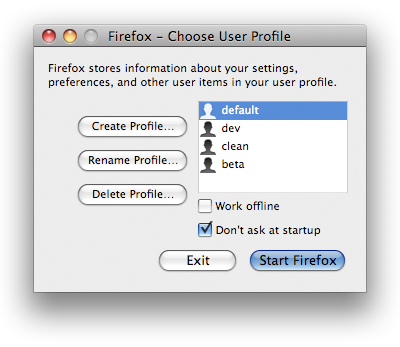
The way to create a Firefox profile are in the Profile Manager. This is how to open Profile manager on different platforms:
Profile manager in Windows
Open the Windows Start menu and choose the Run option (on Vista, it might not be there – just press Windows key + R in that case). In the run dialog, write firefox -P and press enter/click OK. Choose Create Profile in the dialog and follow the steps.
Profile manager in Mac
Open the Terminal (located under /Applications/Utilities) and type in:/Applications/Firefox.app/Contents/MacOS/firefox -profilemanager. Choose Create Profile in the dialog and follow the steps.
Profile manager in Linux
Open a terminal, use cd to navigate to your Firefox directory and then enter ./firefox -profilemanager. Choose Create Profile in the dialog and follow the steps.
Remember to uncheck the Don’t ask at startup checkbox – that way, for any instance of Firefox you start, you can choose what profile you want to use.
New offerings with Firefox 3.5 for web developers
All new features are listed in Firefox 3.5 for developers, but let’s give a brief list of what I find exciting:
HTML 5
- Support for the
audioandvideoelements. - Full support for the offline specification
- Native drag and drop support
CSS features
- Supporting
@font-facerules for downloadable fonts. - Support for CSS media queries, meaning support for media-dependent style sheets.
- The
:beforeand:afterpseudo-classes now fully support any CSS 2.1 variation. - Supporting the
chunit. -moz-opacityhas been fully removed, and replaced by the standardizedopacityproperty.- Support for the
-text-shadowproperty. - Support for the
word-wrapproperty. - The
white-spaceproperty now also supports thepre-linevalue. - CSS transforms, via the
-moz-transformand the-moz-transform-originproperties. - Support for
:nth-child. - Support for
:nth-last-child. - Support for
:nth-of-type. - Support for
:nth-last-of-type. - Support for
:first-of-type. - Support for
:last-of-type. - Support for
:only-of-type. - Support for
-moz-box-shadow. - Support for
-moz-border-image. - Support for
-moz-column-rule. - Support for
-moz-column-rule-width. - Support for
-moz-column-rule-style. - Support for
-moz-column-rule-color. - Support for
-moz-nativehyperlinktext. - Support for
-moz-window-shadow. - Support for
-moz-system-metric. - Support for
-moz-appearance.
DOM features
Support for these:
- localStorage
- Using web workers
- Geolocation API
- querySelector and querySelectorAll
- Mouse gesture events
- The NodeIterator object
- The MozAfterPaint event
- The MozMousePixelScroll event
JavaScript features
One of the most exciting features are that of native support for JSON, but there have also been some other improvements with the implementation of JavaScript 1.8.1 (also, don’t miss my JavaScript test suite for features and web browser support).
Networking
- Cross-site access controls for HTTP
- Progress events for XMLHttpRequest
- Improved Synchronous XMLHttpRequest support
- Controlling DNS prefetching
Canvas features
- HTML 5 text API for canvas elements
- Shadow effects in a canvas
- createImageData()
- moz-opaque attribute
Are web developer extensions ready?
Naturally, the most common thing that hold web developers back from upgrading is if their favorite tool will work with the new version. If we look aside the possibility of running multiple versions of Firefox at the same time, and instead at the most popular Firefox web developer extensions and Firefox 3.5 compatibility, things are looking good!
- Firebug
- The best web developer tool in the world does work with Firefox 3.5! The latest version, 1.4, is in a beta state, and as a user and developer of extensions to Firebug, I think it’s not perfect just yet, but it does work well overall.
- Web Developer
- The Web Developer toolbar works just fine with the new Fox!
- HTML Validator
- Besides Firebug, this is one of the extensions I have become completely dependent on! And luckily, the new version 0.8.5.8 works just fine! Note: you can only download the Windows version from the Add-ons web site, whereas the Mac and Linux versions are available in the developer’s own web site (what’s up with this?).
- Page Speed
- Above-mentioned Steve Souders have made sure that his Page Speed extension to Firebug works.
And, if one takes a look at the Web Developer’s Toolbox Collection in the Add-ons web site, you can see that every extension but one is compatible with Firefox 3.5. The only one I have found, that I use, that won’t work with Firefox 3.5 is YSlow.
And really, I don’t know why YSlow isn’t ready for Firefox 3.5. I think extension developers have had quite some time to prepare, and Mozilla have helped out well with their article Updating extensions for Firefox 3.5.
My only guess is that the YSlow people didn’t feel ready to develop for the current beta version of Firebug, and maybe are waiting for a later release. Whatever the reason, I sure hope they release a new version for Firefox 3.5 and Firebug 1,4 soon, because it’s a great extension.
And, naturally, I would like to mention that my extensions all work with Firefox 3.5 as well:
Therefore, don’t worry. At least as a web developer, virtually all vital extensions are ready!
Summary
The release of Firefox 3.5 is very exciting, and I’m really happy it’s out now! I should also mention to you Swedes out there, at least those that are Stockholm-based (or willing to travel), there will be a release party later this summer! However, since all of Sweden seem to be on vacation during July, this will probably take place in August. Stay tuned!
And, to end this article, if you’re in the mood, there a pretty Firefox 3.5 wallpaper available as well. 🙂
On Windows, it is easier to use Firefox Portable for older versions than creating multiple profiles/shortcuts.
http://portableapps.com/apps/internet/firefox_por…
Lim Chee Aun,
Absolutely, that's a good option too. Thanks for the tip!
[…] Firefox 3.5 släpps, också den med stöd för ovan nämnda […]
Hi:
3.5.2 I have this new browser, and Cuá, I just upgraded a while ago.
According to everything I have, from 3.5, with GMDesk, I can not take the links as it had in version 3.0 of Firefox, that it could drag and drop links to Firefox. And it worked wonderfully!
But with this new branch hace3 already taken a little over a month, the thing is no longer the case. If you drag a link from GMDesk because I do not want either to operate or shot. Even using other preferences, or creating a new preference in the same browser.
Now it is no longer the same. No Govt.
I do not know if the problem GMDesk, or rather, a new feature of the new browser, I do not understand why they have to remove that mission they had before.
Greetings.
Santiago Jose Lopez Borrazas,
Interesting. I have no idea why that has changed, and what could cause it.
In case anybody else bumps into the same issue, note that you must close any open Firefox windows before launching the profile manager. If you don't, "firefox -p" may just open up a new window with your home page.
See the <a href="http://support.mozilla.com/en-US/kb/Managing+profiles?s=profile%20manager#Starting_the_Profile_Manager" rel="nofollow">help page on Profile Manager for details.
Mark,
Good input, thanks!
Nope.
It seems that this is not the problem. The problem is that, apparently the Firefox has a special and internal configuration under Windows (on Linux no problem, because it works very well drag and paste the GMDesk).
So, has a lot on this issue I raised earlier this year, since it is a domestic issue rather than anything else, and we do not solve it easily.
Thank you very much and greetings.
There is no bloody profile manager in Firefox 3.5.5! I have tried every conceivable option and Windows just keeps telling me "Can't find Firefox". I have tried "Firefox.exe -p", "Firefox.exe -profilemanager"; I have tried typing in the complete path to the bloody exe file and it STILL doesn't know what I'm talking about! When I click OK, all it does it open my homepage! Either this is a Windows problem (in this case Windows 7 64-bit Ultimate), or Firefox. Either way, I can't access this Profile Manager anywhere. It's not in Firefox 3.5.5! It's not even in the Firefox folder!
Tim,
Try the information in Firefox 3.5 – Windows Vista and 7.
Alternatively, use the terminal in Windows to go to the folder with Firefox.exe and then run <code>Firefox.exe -profilemanager</code>.
[…] 01: Firefox 3.5 is released – information about having multiple Firefox versions and web developer… […]
[…] http://robertnyman.com/2009/07/01/firefox-35-is-released-information-about-having-multiple-firefox-v… […]
[…] site is working with the next Firefox version: download the Beta release of Firefox 10 (you can run several versions of Firefox simultaneously) It is always a good idea to use the beta, or even the aurora, version of […]