It seems likely that at the end of 2006 Internet Explorer 7 will be released. First, let me say that the IE team has undoubtedly done some great work when it comes to fixing the numerous flaws in IE 6 as well as adding a heap of new CSS support (more detailed in Details on our CSS changes for IE7), although I think it’s a joke that display:tablestill isn’t supported.
But, my main question is: is catching up good enough?
After doing some extensive testing, due to some error reports that the overlay layer didn’t cover all parts of the web page if it had a scroll, I’ve now updated the script to take that into consideration as well. A positive effect of this is that, during a slideshow, it will automatically adapt the overlay size if the user resizes the web browser window or scrolls within it.
Also, one of the biggest upsides to this is that I’ve eliminated the need to add CSS specifically for Internet Explorer to handle overflow scenarios. The CSS code below has been updated accordingly.
So, I sincerely ask of you to download the example package (ZIP file link) to get this important fix, or if you already have your own custom CSS, to re-download the JaS JavaScript file and simply replace your current one.
Looking at nice features like Lightbox JS and what my friends at Particletree did with Lightbox Gone Wild!, I found it to be a given to add this functionality to JaS – JavaScript Slides. Now the image view, as well as the slideshow feature, supports it in different combinations.
Microsoft has just publicly announced Zune, their iPod competitor. And, surprisingly enough, at least it doesn’t look as tacky as I expected. According to TechCrunch in Zune is Here:
The Zune has 802.11 networking built in and you can send a song to your friend for three days or three plays…
If you’re obsessed with using the keyboard instead of the mouse as much as possible, and you have chosen to use the best web browser out there, Firefox, then Smart Keywords is the feature that will make your day and save you a lot of time!
Remember something called Geek Meet? People with a sincere interest in web development, always up for learning more and hanging out with like-minded? Well, fret no more! It’s time again! 🙂
I remember September 11th 2001 as if it were yesterday. I was sitting in the office working as usual when one of my colleagues sent me a link over IM to a Swedish news web page. I clicked the link but didn’t get in since the web site failed to respond. I went over to his desk and asked what it was all about.
A plane has just crashed into the World Trade Center.
For those of you using the very flexible AJAX-S for slideshows, I have now created a little add-on script to hide the footer and only showing it when moving your mouse pointer over it.
For many web developers, CSS means numerous of ways to create flexible designs, control fonts in a powerful manner and a central location for controlling the entire look of your web site.
Unfortunately, CSS is far from perfect so I thought I’d list the most common disappointments I have, given the current state of CSS support, and I will also go a little into what your options are and what the future holds.
Today Steve Irwin was fatally wounded by a stingray barb today, and passed away. He was known to most people as the Crocodile Hunter and has influenced an entire world with his work with animals.
We’ve all thought that CSS is short for Cascading Style Sheets and that’s all it is to it, but apparently that’s far from the truth. The other day I found another meaning, perhaps the true one, that I think applies to me…
Today it’s my birthday! Yay for me! How old I am? I have now reached the age of 32, but still feel very young (most of the time).
If you’re one of those kind souls that now feel an urge to congratulate me, I’d be more than happy to accept your comment! Please write Happy Birthday in your own language so we can all learn something from this… 🙂
So, blow my candle! (English isn’t my first language, so please excuse me if there’s anything wrong in that sentence… :-P)
Event handling in JavaScript has been an issue for many web developers, and countless of people have made their stab of solving it. When I wrote my post AJAX, JavaScript and accessibility some commenters were asking for a follow-up post explaining event handling in JavaScript. My idea here is to give you a basic background and to also tell you about a new and interesting solution.
There’s something I haven’t told you; I’ve even kept a secret, if you will. As you might know, a number of web developer bloggers also create secondary blogs that deal with their other interests; topics such as coffee, wine, food etc seem to be very popular. So, now it’s time for me to reveal my new blog, and it will, hopefully, be nothing like you’ve ever seen!
With us now living in the midst of the so-called Web 2.0, social networking and tagging, tagging, tagging, I’ve come to question, or rather ponder, some of the things that goes with this. These are:
Can we trust people to add valid tags to their content?
When I first heard about Flickr I liked the idea, but being the rebel I am, I was a bit reluctant to use it since everyone was hyping it so much. However, for those of you that haven’t noticed the little Flickr icon and link I’ve added to this web site: I now have a Flickr Pro account.
During this summer I decided to finally take the plunge, and this post is about what I think is good respectively not-so-good with Flickr.
Convince a friend/lover/enemy to download Firefox before September 15th, and your name will be put in the Firefox 2.0 code. I found this a little while ago and naturally I want to help to spread Firefox, and also to get my name in there. So, do it you too; just go to Firefox day and make it happen! 🙂
First and foremost, let me tell you that I don’t abide to the poor labeling of being a Mac fanatic or a Windows user. I’m a computer user, period. I use the programs and computers and programs that are good, no matter what their eventual name might be.
With that said, I hope this post will be balanced and fair instead of just trying to take sides, and informative no matter from what angle you’re coming.
Yes! I’m back! And let me tell you that I’ve missed you, and I’ve missed writing. There’s something extraordinary about writing blog posts and then get in touch with and make friends with people from all over the world. To have discussions with like-minded people about topics which we share an interest in.
This post will be filled to the brim with various information; from a new feed URL and other changes to what I’ve been doing this summer, so please read on.
This is my goodbye. For now. Starting today I will be on a four-month parental leave, from work and any other responsibilities, to spend time with my daughter Emilia. I truly couldn’t think of anything better to do with my life.
During this time I might write some post, but then again I don’t find it likely. My idea right now is to start writing here in September again, if I feel like I want to and that I can contribute in any way, but please don’t take that as a promise.
I would just redirect a big thank you to the numerous people reading, commenting and helping me out in any way. Also, you have all made me become a better web developer, writer and person.
Thank you, all. Take care of yourselves, and of others.
There seem to be some kind of worshipping of certain personalities online, and at the same time, well-known web people who misuse their position. I don’t know if it’s me becoming jaded or if it’s an accurate impression of the state of the web, but here goes…
I will be featured in the next issue of Internetworld . There will be a two-page spread called The Pro’s Choice, where I list three web sites that I like and the reason for choosing them.
Next Geek Meet will take place June 8th at adocca entertainment, Södermälarstrand 57B, floor 6, and the time is 18.30. Please write a comment and provide a valid e-mail address if you know you can attend.
Last night we held the first Geek Meet in Stockholm. In my experience, it was an immense success, if for nothing else, at least compared to my expectations.
Pretty much everyone that had signed up actually came, about 17 persons in total. After a rough start with a lot of unexpectedly locked doors in the building, people getting lost, one person held up by a robbery in downtown Stockholm etc, everyone seemed to really enjoy it.
Forgive me if I’m missing some basic point here, but something I truly wonder over is if we actually need antivirus software. I mean, no matter the name of the operating system, isn’t there something fundamentally wrong with it if has got security holes that allows one to infest your computer in such a way that it becomes unusable?
Firewalls I buy. Naturally no one should get unapproved access to your computer. Same thing if you download some installation package from a dodgy web site: you’ve got yourself to blame.
But, in the case of Windows at least, you need to have some antivirus software running all the time that eats a lot of performance from your computer, and writing/downloading files to the hard drive takes forever since every file has to be scanned, it needs to constantly update its definitions etc.
Out of curiosity, I’ve unplugged the network cable on some computers and just tried doing some basic tasks and also transferring files over USB from an external hard drive. The performance experience is staggering!
And part of me starts to wonder if all these antivirus software vendors are riding the wave of people’s fears, that their product will be bought just out of “better safe than sorry”-panic. Sure, certain operating systems have some serious flaws, but shouldn’t those be fixed by the operating system vendor before the system is released to begin with?
Sure, of course there can be some glitches in a product, but none should be as serious as to threaten your computer in the ways it is now possible.
PS. If anyone knows of any good light-weight antivirus program for Windows (free would be great :-)), then I’m all ears. DS.
Yesterday I went to visit some fellow consultants at their assignment for a sub company/department of one of Sweden’s largest banks. We had a talk about AJAX in general and different ways of how to implement it, and one of them opened his web browser to navigate to some AJAX-based web sites.
Something interesting followed next that really baffled me. Most web sites he went to had empty white patches where no content showed up, and some web pages even went completely blank. We knew for sure that JavaScript was enabled in his web browser of choice (IE, but still almost a real web browser… ;-)) so that couldn’t be the problem.
Then, naturally, we had to go test my ASK script to see what was going on. The version that we got there was the fallback version that works without JavaScript, but instead with regular links reloading the entire web page, meaning that no JavaScript events were applied.
After some digging, we found out that the JavaScript file was completely blank! The reason for this, apparently, is that the proxy server they had to go through to access internet totally cleansed any JavaScript file that contained this text:
new ActiveXObject
So much for object detection and every other approach we recommend to web developers. Not a single line of code was left behind in the file. And the problem is that it won’t throw an error or show the content of a noscript tag either; everything just stops working.
My initial reaction was that if they have such a tight security environment doing that, I really don’t want to care to cater to them. But as my boiling blood got calmer (kind of an exaggeration), I realized that this company was too big to ignore the fact that all their users got shut out.
Also, if they have a situation like this, it’s likely that many other large companies have a similar solution.
Conclusion: if you want to develop AJAX apps, make sure that it works without JavaScript as well, apply all the scripts in an unobtrusive fashion. I’m just glad that ASK passed the test with its accessible groundwork and then building AJAX functionality on top of that (Actually, the Google Analytics code of the ASK page did in fact throw an error when we tested it, but I think it was just a consequence of the proxy server doing it’s job…).
I guess most of you, one time or another, has had the need to find out what style was actually rendered on an element. The easiest way to do this is through the style property followed by the specific value you’re looking for:
var intPosLeft = document.getElementById("left").style.left;
However, this only works if the CSS has been applied inline on the element. As we all (or at least most of us) have realized, having inline styles isn’t a very good and efficient approach. So then we move all our CSS to an external file and suddenly the style property return no values when checking it.
What the hell happened?
The style property is reserved for inline styles (ridiculous, if you ask me), so you need to find another way to do it. Of course, then, there’s one standard way and one Microsoft way.
I have put together a function named getStyle (yes, the name is supposed to be funny) to solve this issue for you:
I’ve updated one line for IE per zcorpan’s suggestion. The previous code worked fine as well, it’s just a matter of personal preference when it comes to code syntax.
The first parameter is an object reference to the element you want to check, the second is the CSS name of the property you want to know the rendered value for.
Interesting to know is that specific values will return a value even if it was applied by shorthand in the CSS. For example, this will work just fine:
/* Element CSS*/
div#container{
	font: 2em/2.25em Verdana, Geneva, Arial, Helvetica, sans-serif;
}

var elementFontSize = getStyle(document.getElementById("container"), "font-size");
An other interesting thing is that Firefox, Opera and Safari will returned the actual pixels of a font size applied with em, while IE only return the value in em.
Web browser compatibility
This script has been tested to work in the following web browsers:
IE 5.5+
Firefox
Safari
Opera 8.5
The reason that it doesn’t work in IE 5.0 is having a function in the replace method as a second parameter. You might want to put this in a try...catch clause if you expect any users with that version, like this:
try{
	strCssRule = strCssRule.replace(/\-(\w)/g, function (strMatch, p1){
		return p1.toUpperCase();
	});
	strValue = oElm.currentStyle[strCssRule];
}
catch(e){
	// Used to prevent an error in IE 5.0
}
Is Web 2.0 as hyped as dot-com businesses were? Are some people in every company/organization/movement more interested in fucking each others’ butts patting each others’ backs than actually doing something worthwhile? Is the web still immensely exciting? Does Microsoft have a bad reputation? Are people still blinded by different technologies as opposed to focusing on the actual goals of a product?
My whole life, as long as I can remember, I’ve been afraid of dying. The fear seems to hit me in waves, but it’s always there, constantly reminding me of my mortality.
As we grow up, most of us reach a time when we start to think about life, death, universe, why we’re here. Some think about it while lying in their beds at night staring out into the darkness, some share it with friends when drunk and some just try to suppress these thoughts as soon as they surface. What almost every person seems to have in common with each other, though, is that we desperately try to find a reason for living, a meaning with our existence.
One person might find cause through religion, while others find comfort in trying to understand as much as possible of the science we use to try to explain this phenomenon we refer to as life. But almost everyone seems to strive for an answer, a reason, a motivation to keep going.
Why am I afraid? I can’t even begin to fathom that my life will end, that my body will stop functioning and that all the thoughts, love and sorrows I bear with me will vanish. That I will cease to exist, and that I will be just gone.
I’ve heard that the older one gets, the more one comes to term with the fact that life isn’t endless. That we have been given a certain amount of time to live, and all we can do is try to make the best out of it.
You might look upon these thoughts as the ones of an unhappy man; on the contrary! My life is beyond my wildest expectations! I have a wonderful girlfriend, and a daughter that I love so much that no words of man are worthy of describing such strong feelings. I have seen so many things, been to numerous places and have met so many interesting people in my life. In my line of work I have reached a moderate success and respect, and I constantly want to become better at what I do. I also sincerely hope to constantly keep evolving into a better and less selfish human being.
But all that just makes the fear even worse to handle. To one day lose everything I’ve fought so hard for; to not be around to help and aid my family, in sorrow and in joy. At times, I can just neglect the various thoughts, and then at other times I desperately stare out into the vast emptiness hoping to find some way to be strong enough to withstand the psychological terror a fear of death brings to you.
Ever had a dream that felt more real than life itself? I’m sure you have, one time or another. Some of mine have been dreams of actually dying, waking up in the middle of the night, drenched with sweat and literary screaming my anxiety out into the room; my mind boggling and my body shaking with reluctance against the implication of death.
Maybe we do have souls, perhaps they do live on forever; maybe we’re all incarnated from who knows how long back in time. There is the slightest chance that we might remember and carry with us who we are, and that’s the fraction of hope I cling on to. Nevertheless, my fear is still there.
This article is co-written with Anne van Kesteren, W3C Member and contributor to the WHATWG and Opera specifications, R&D and QA person.
When developing a web page, DOM methods are generally the way to go when dynamically altering elements’ attributes and performing other operations. But what about adding content to a web page in the most efficient manner, both code- and performance wise? We claim that innerHTML is unmatched by any DOM methods available and that it is in most, if not all, situations the best option.
People seem to have this feeling that innerHTML is evil. Instead of one line of innerHTML you would use about twenty lines with calls to the DOM. Every such line making one change. However, innerHTML is actually not that bad. The web browser pretty much parses it much like it parses the original page and builds some DOM nodes out of it which are then inserted at the requested location. Some mutation events are dispatched for the few who care and all is fine.
When it comes to having greater scalability in a web page, especially in AJAX scenarios, innerHTML offers unmatched flexibility. There has also been benchmark tests verifying that innerHTML is more efficient compared to using DOM methods.
The fact that it is not in a standard is simply because nobody got around to it. If you read the mailing list of the W3C Web API’s Working Group you can see that Opera, Mozilla and Apple want it to be standardized and we bet Microsoft would like the same thing. New entrants in the web browser market are probably interested as well given that it has to be supported anyway. That it’s not in a standard is probably its biggest problem, apart from the name which doesn’t really scale well. On the other hand, people complain a lot about document.write() as well which is part of DOM Level 2 HTML.
So, go on! Start, or continue, to use the best tool available for the job!
As all of our lives, or rather the services we use, become more and more web-based and moving away from being locked down to one specific computer, online storage capabilities is definitely a huge part of that transformation. Sure, one can drag an USB memory stick around or a MP 3 player with a hard drive etc, but I prefer just getting online and downloading things.
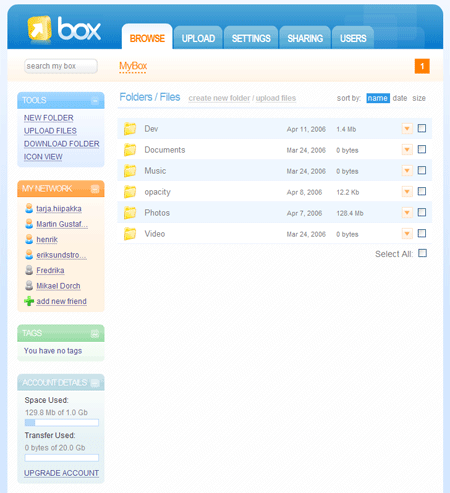
As of lately, I’ve been testing the Box.net service, which has a nice sleek interface and is easy on the eyes.
The general features are:
1 GB storage for free (with prices starting at $4.99 per month for 5GB)
Private sharing
Public sharing
Desktop Sync software (upcoming)
Work groups
Uploading
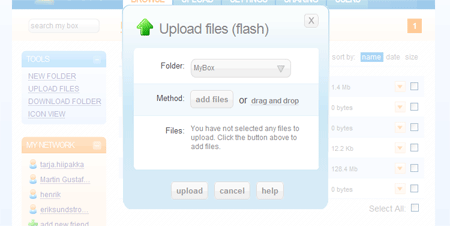
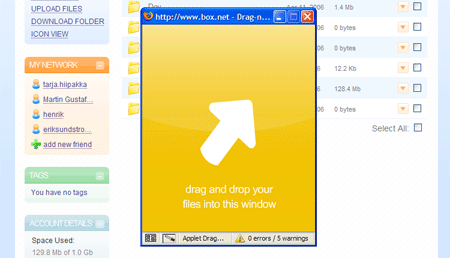
There are two basic ways to upload files: through Flash and through drag and drop, and since I’m a big fan of drag and drop, that’s the option I use.
Flash upload dialog
Drag and drop upload dialog
Sharing
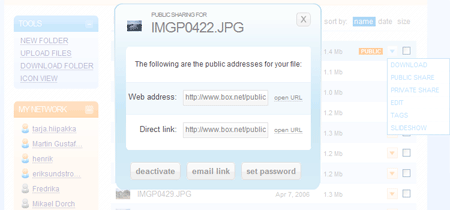
One great feature is sharing your files. You can either share them privately with other Box.net users or you can share them at a public URL for anyone to download, with optional password protection. Very handy, as opposed to e-mailing large files, sending them over IM or something similar.
The Public sharing dialog
What I miss
I would love to have FTP access to my account, for easy and swift uploading. Sure, Desktop Sync might happen, but I’d like to have free access to my file structure and to use my FTP tool of choice.
Conclusively, I think Box.net is going places. They’re still working on some minor issues, but they’re also very humble and open for feedback, so just let them know if you have any questions.
Except from a good service, Goowy‘s file sharing is based on the Box.net API and they have also become a module in Netvibes, so they seem get their share of attention. 🙂
The creators of Box.net also blog about the service and what’s going on in terms of competitors’ services, for anyone wanting to stay on top of things.
Most web sites out there don’t abide to web standards, use table-based layouts and are JavaScript-dependant. If you work with web development and you still haven’t got a clue, I think all hope is gone. Then you must be sincerely devoted to not doing a good job, or stray from conventions just to spite.
If you write valid and semantic markup, and add JavaScript in an unobtrusive fashion, your web site has come a long way when it comes to accessibility and SEO as well. It’s all there, one big package of building something great.
If you don’t do it that way and aren’t willing to learn, I won’t bother you anymore. It’s your problem, and something you have to deal with.
Law enforcement
Maybe I’m naive, but I don’t believe in laws enforcing accessibility. They can never be a 100% fair and balanced, and it’s a highly subjective matter. What is truly accessible? On the other hand I understand that when it comes to the public sector there has to be some regulations, when we’re dealing with matters about informing and facts that every citizen has a right to be able to get to. That I support.
For the private sector, however, I sincerely hope that reaching more visitors – thus getting more customers, getting a better search engine ranking, goodwill and actually doing the right thing should be incentive enough.
In the end, if companies choose to make their web sites inaccessible, it has to be their call. It’s their web site and they can do whatever they want with it. They will probably get bad press, like with Target, but I don’t think suing helps. Ultimately, my belief (read: vision) is that the market will cleanse itself; if you do things bad, people will choose another company to do their business with. Easy as that.
Accessibility consultants
On the other hand, we have people fighting for accessibility. Most of them good people doing it for a good cause, but sometimes their critique gets too harsh or is taken as being elitist, and that doesn’t help. Instead, companies being pointed out in such context don’t take it as constructive criticism, but instead as an attack and choose to ignore the people pointing out their flaws. It has to be done in a more respectful manner.
Also, critique is always aimed at the companies who it feels good to point the finger at. I’ve never seen anyone lash out at Flickr or Google Maps, although they don’t work properly with JavaScript disabled. The slideshow just goes dark in Flickr and Google Maps redirects you to a web page telling you that your web browser isn’t fully supported
Flickr slideshow with JavaScript disabled
The Google Maps redirect page if JavaScript is disabled
Why people leave them be? My guess is that people like Flickr so much and that Google Maps has got such a great API for building mash-ups, that they’re willing to overlook such things. Don’t. Be consistent.
A great initiative
Accessibility is often looked upon as something holding web development back, which isn’t true if it’s implemented in a correct manner. Also, some think that trying to make a web site accessible for people with any disabilities and/or platform means that it has to work exactly the same for everyone. It won’t. But make sure it degrades nice so everyone can at least partake of the information being given.
To me, just bashing inaccessible web sites doesn’t seem to do the trick. The people responsible just seclude themselves in their own shell, and hope the problem will go away. Instead, I applaud such initiatives as Accessites.org, which is about premiering good looking and functionally-wise excellent web sites that are at the same time accessible. I think that’s the way to do it, to show that something can be great and accessible.
To be hit by a meme is usually quite entertaining, and I like the nostalgic feel of the latest one. First Faruk got me and then Jonathan Snook took a stab so I have nothing else to do but abide and share some parts of my history.
One year ago
Just a little over a year ago I wasn’t entirely pleased with my employer, so out of boredom/curiosity I started this blog. It was then on Bloggerand in Swedish. When I signed up I had to choose a name for it, and in a panicky fashion I choose the corny name “Roberts prat” (which loosely translates to Robert’s talk), and it just stuck around. After a few weeks I realized that I knew a number of English-speaking people who would be interested in reading too, plus the fact that it would make it easier to reach out, so I translated the posts I had written so far into English.
My wonderful daughter Emilia was about 8 months old then.
Five years ago
I had fairly recently gotten back from my New York stint and been working for some months for a company called iBizkit. Very valuable lessons were learned and I left the company to travel around the world in 2002.
I was also (finally) living within Stockholm city, in the great Södermalm part, together with Fredrika. I was also working out a lot of the time.
Ten years ago
Ten years ago it was still seven months till I would purchase my first computer. I had moved away from home to my own apartment located in the area of Mariehäll in Bromma, 43 square meters/51.4 square yards consisting of one room and a kitchen.
I was working for UPS and had just been internally promoted to dealing with their key accounts in the terms of billing and any accounting queries they might have. I left this job at the end of 1997 to travel around in Australia for a couple of months.
Who’s next?
I had to do some serious pondering when it came to this. I wanted to choose persons that don’t normally get memes, to give them a chance. So, therefore, I proudly pass it on to Carl Camera, Stuart Colville and Shane Shepherd.
As of recently, I’ve had enough of trying to keep track of appointments and other assorted obligations. Fredrika writes things for hand in her little secret calendar, which means there’s no way I can stay on top of things going on or actually double-check when I’m not actually in the same room as here.
This led to me starting to look around for web-based calendar services, where one can enter data and it will be available from any computer at anytime, and also get reminders. Just as I was testing some services, Google were kind enough to apply to my needs and released Google Calendar.
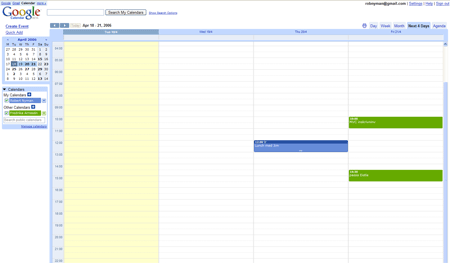
Google Calendar has got the look and feel of GMail and other Google applications and you can just start using it with your existing Google account.
Different views
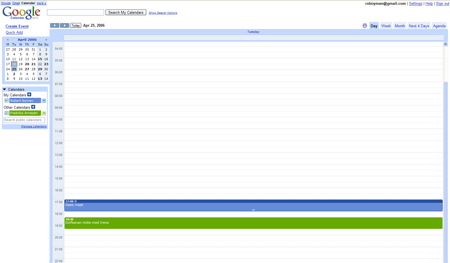
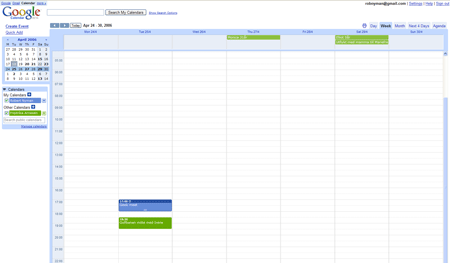
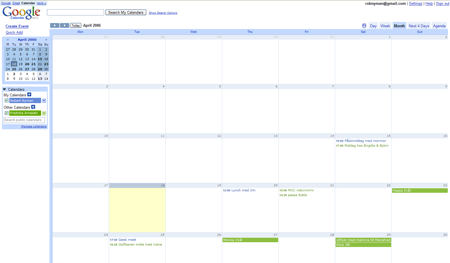
Google Calendar supports five different views:
Day
Week
Month
Next 4 Days
Agenda
Creating events
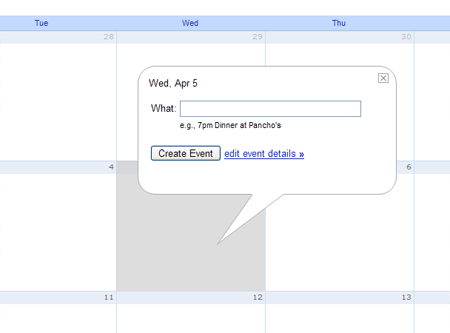
It is very easy to create an event: just click the desired date/time and enter a subject. You can then drag and drop existing events to move them to another date/time.
Notifications
It’s possible to get a notification through an alert box, e-mail or a SMS text message. I would love that last option, but it seems like it’s only available for US citizens.
Sharing
You can also share your calendar and events with others, which is a great thing! This lets you have your own calendar, share some or all events and then also color-code your and other calendars’ events to easy distinguish whose appointment it really is. Your calendar with the events labeled as public is made available at a public address, and there’s also a private address you can use in other calendar applications.
Missing features
I would love some way to synchronize the information with a PDA or cell phone and be able to use it offline.
All in all, a great service that is yet another step for me from being dependant on just one specific computer.
If you’ve ever met Chris Mills, you won’t forget him. His physical apparition is something that lingers in your mind for a while, and if you actually talk to him, it makes things even more exciting.
He’s tall, very beardy, eloquent, the Senior Editor of friends of ED, loves heavy metal, plays in two bands, has got a freakish sense of humor and is always up for adventures. What’s not to like? 🙂
And now he has started blogging with bloggEd, which, of course, is a very entertaining read. My only worry is that he’ll probably have more readers than I have within a week (if he doesn’t already), and that I’ll be superfluous very soon…
Oh well, I have to be the bigger man here and still say: go read! You won’t regret it.
I’ve done a very minor change to the event handling to cover up for a bug in IE’s garbage collector (something I hear will be addressed automatically in IE 7). In 99,9% of the cases you won’t notice any difference, but if you use it in a very advanced web site/web application it might make things better and less resource intensive.
Updated October 25th 2007
I get a number of e-mails asking how to start the slideshow as soon as the page is loaded. Add this code to the end of the jas.js to make it happen:
(The setTimeout is to avoid a content parsing bug in Internet Explorer)
Pretty much everyone wants to display and show images to other people, right? So many use Flickr for it, and while I think it’s a great idea and that it has got some wonderful features, my main gripe is that if I present images, I want to do it in my own web site.
People who do it themselves, on the other hand, always think Flash is necessary just to have fading and a nice little slideshow. Not true.
Therefore, I created JaS – JavaScript Slides. It is a highly customizable JavaScript library for easily turning your images into a collection viewable as a slideshow, and with fading effects, if desired. It also supports automatic thumbnail creation and tagging of images, so the viewers can find the exact images they’re looking for.
Humbly described, it’s like your own little mini-Flickr that you can use wherever you want to, and skin and brand it the way you feel appropriate. It’s also a way to showcase the independence and separation of the interaction and the design of a web page.
The geek meet has gotten a sponsor that offers a place to be, food and drink. Not bad, eh? 🙂 The new location is: adocca entertainment, Södermälarstrand 57B, floor 6, and the time is 19.00.
Ok, this idea might crash and burn so hard, therefore I just felt I had to do it! 🙂
The idea is to have a very informal gathering of people located in, or visiting, the Stockholm area who are interested in web standards, semanctics, accessibility etc. It will be a time for people to meet and discuss, get to know people and share experiences. The meeting will take place on April 25th at 17.00, most likely at my employer’s office in Kungsgatan adocca entertainment, Södermälarstrand 57B, floor 6, and the time is 19.00.
Does this sound interesting to you? If yes, please write a comment letting me know if you’re coming!
So, if this doesn’t fail miserably, I really look forwarding to meeting you then! 🙂
Today I have a debate article in today’s issue of Computer Sweden, and already in page 2 (meaning that everyone will read it :-)). It can also be read here: LÃ¥t användarna pÃ¥verka webben . Most of it is just stating the obvious about focusing on end users and caring to all different kinds of accessibility needs, but I also manage to throw in a little comment regarding what I feel about the Web 2.0 hype.
Nevertheless, reaching 130 000 readers is never bad. 🙂
In Stockholm we have two morning papers for free, Metro and Stockholm City . Since I have about one hour to commute one-way, reading these really helps to make the journey to my job as pleasant as possible.
What stands out, though, is one columnist from each paper: Nima Daryamadj writing for Stockholm City and Stephan Mendel Enk writing for Metro. Both are very eloquent, and skilled enough writers to throw in just the perfect amount of humor to be entertaining and spellbinding while at the same time driving through very important and serious standpoints. Examples can be found in Nima’s excellent Ska kungen kalla oss â€Âsvennarâ€Â? and Stephan’s Brottsmoral lär sig barn i sandlÃ¥dan .
If any of these would ever produce a book with a collection of their columns or something of the like, I’d love to read it (actually, Stephan has previously released the book Den problematiska manligheten if anyone’s interested).
So, Nima or Stephan, thank you!
If any of you ever read this and are in the Stockholm area, please contact me and we’ll do lunch, ok? 🙂
As soon as the Intel-based Macs were revealed, people started to find ways to run Windows XP on them. The most spoken about resulted in a contest where the winner would get the money that a lot of people had contributed with. Naturally, it succeeded. To get down and dirty with the result, please visit OnMac.net.
I guess some people’s desire to run Windows XP on a Mac was to finally have a lean good looking computer with the OS they prefer; for some people it was about having it all, being able to dual-boot Windows and Mac OS X on the same machine. Some prefer one OS over the other, and some need both in their daily work.
An interesting twist came yesterday. Apple has officially launched a tool to run Windows XP on an Intel-based Mac. The days of wonder are apparently still here… The name of the tool is Boot Camp and for the moment it is in beta but offered for download by Apple. The final release is said to be shipped with the next major release of Mac OS X: Mac OS X Leopard.
What you also need to do in order to run Boot Camp is to update the firmware in your Mac. The different downloads are:
An alternative solution to this problem is my FlashReplace library.
Although news of this has been around for a while, many people seem to have missed it and/or didn’t think it was worth reading up on. On the contrary, the implications of this are huge and will most likely affect a lot of web sites. Due to the patent case with Eolas, Microsoft has been forced to update how ActiveX components behave in web pages.
This dreaded update, named Microsoft Security Advisory (912945), has been available for a couple of months, but on April 11 it will be forced out en masse through Windows Update so we have a few days till all hell breaks loose. If you want to test your web pages before that, you can download the patch and install it right now.
The gist of the patch is that no interaction with ActiveX elements will be initially allowed until the user has enabled the ActiveX by clicking it or tabbing to it and then pressing spacebar or enter. When hovering the ActiveX element the user is presented with a tool tip text that reads:
Click to activate and use this control
Examples:
Naturally, no one wants your Flash movies, videos and the likes to be presented to the end user like that. “Luckily”, there’s a fix for it, which I guess is because of some kind of glitch in the patent. If you create the ActiveX object, in most cases this means an object tag, through script, then you will bypass this security warning.
There’s an article on MSDN, Activating ActiveX Controls, which describes different techniques doing this. Noteworthy is that it won’t work with inline scripts in the web page, only external ones.
Updated April 6th
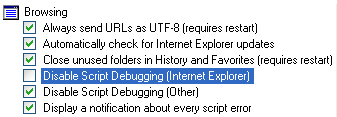
Tanny pointed out a serious problem when it comes to JavaScript solution; something I’d read about but hadn’t tested properly. If Disable Script Debugging is disabled in IE (the checkbox is unchecked), the script workaround won’t function either. However, I think the default setting in IE is that this is enabled, so it will hopefully not affect a majority of the end users. You find that option under:
Tools > Internet Options > Advanced, under Browsing.
What I think of this
I don’t know any deeper details of the patent case, but I think the whole idea of this sounds ridiculous. My general opinions/fears are:
Using Flash or video in your web pages shouldn’t, in my opinion, be dependant on if script is available/enabled.
There will be so many cases of poor JavaScript practices trying to add content to a web page.
I’ve done some testing and ran into problems in IE when adding param elements to an object using DOM methods. Instead, writing out the same HTML code by using the innerHTML property worked… 😐
With this, XHTML web pages served as application/xhtml+xml will probably never see the light of day, since a lot of web pages will now depend on code like document.write and innerHTML (Note: innerHTML does indeed work in Firefox when the XHTML code is served as application/xhtml+xml).
What happens if/when Microsoft manages to appeal this decision and win in court? Should we all then change the code again?
If this sounds like too much to you and you want a library/tool to do all this for you when it comes to using Flash, you can take a look at FlashObject (although unfortunately it relies on innerHTML to render the content).
How to uninstall the update
As life on the web goes, many web developers won’t be aware of this, which will result in that you, as an end user, will have to allow every ActiveX movie you see. The solution to this is to uninstall the patch (thanks to City Of Rain for the heads up.):
Go to the Control Panel
Choose Add or Remove Programs
Check the Show Updates box
Find Update for Windows XP (KB912945) and choose Remove
So, whatever you do, please read up on this. It will affect you, as a web developer, end user or when supporting your grandfather’s computer usage…
Today has been just one of those days. I had some work I needed to get done as well as posting something very interesting. What happens?
Internet Explorer dies on my computer…
It started out with Firefox opening up every URL I tried to open in IE. I restarted the computer and set IE as the default web browser instead. This resulted in that every web page was just white, no dialogs worked and I couldn’t view source. Since IE has got such a tight grip on Windows, you can’t just uninstall it and then reinstall it again, so that wasn’t an option to easy fix it.
After some long time spent to try different approaches to fix the problem, I gave up and reinstalled Service Pack 2. Problem is, when the computer restarted and before I got into Windows, the installation contained some kind of wizard in, yeah, you guessed it: HTML. A dialog came up asking me if I wanted to open the file or save it. I choose open, which resulted in IE opening just a blank white page. I closed that window and got an error message. I was stuck.
I turned off the computer by pressing the on/off button and started Windows in Safe Mode. Removed Firefox just to play it safe and restarted it again. No wizard this time, everything seemed fine and I got into Windows. Opened IE: blank white page. Ready to scream words no man should ever utter, I bit my lip and went online once again to find the solution.
Type in “rundll32.exe setupapi,InstallHinfSection DefaultInstall 132 %windir%\Inf\ie.inf” and press enter/click OK.
Locate IEXPLORE.EXE/IEXPLORE.EX_ on the Windows XP SP 2 CD (or download and extract SP 2 using WinRAR to your hard drive and point to that).
Next, then locate mswrd632.wpc/mswrd632.wp_ which is located on the default Windows XP installation CD.
After that, my IE was actually whole again. All in all, though, with all problems I had, waiting, trying to find good guides etc I wasted about three to four hours of my day. The lesson is to never tie a web browser so tight to the operating system…
Yesterday I ran into my friend Phil Sherry (yes, the Phil Sherry) in the street, and as a consequence of that, he humbly asked me if I could mention that his company is looking for people. Normally I don’t accommodate to such inquiries, but I’ll tell you why this is different.
Last week I was invited to their office, where I meet a lot of cool people and got to see the amazing things they’re actually up to. Imagine ambitious people who actually read blogs, who want to constantly learn new things and who like what they do. An environment where people know and respect web standards et al, as opposed to thinking it’s some underground guerilla movement.
Therefore, I truly recommend you apply since this is different from most jobs you can get. And if you’re not Stockholm-based, what better reason can you find to move here than this?
The job description reads:
Seeking Experienced Front End Web Developers, Stockholm
Background:
We are creating a major new entertainment and community portal built on Ruby On Rails. We now need to expand our team with experienced web developers with a passion for web standards, HTML, CSS and JavaScript.
We are located in a very attractive office at “München Bryggeriet”, (Södermälarstrand 57b) overlooking the water and the old town in central Stockholm.
The project is very ambitious and fast paced with many talented people involved.
Responsibilities:
You will be required to:
transform Photoshop mockups into accessibile and standards-compliant templates that display correctly in all modern browsers.
integrate your templates with the Ruby on Rails code by working with loops and conditionals in the template logic.
componentise the templates for reuse across the site by developing Rails (ActiveView) helper methods.
What we’re looking for:
Successful candidates will have several years experience and a proven track record of producing cleanly coded bulletproof CSS layout templates.
Experience of working on Ruby on Rails projects would be extremely beneficial as would experience with other templating systems or scripting languages such as PHP.
Priority will be given to the candidates who can demonstrate a keen understanding of accessibility and usability issues.
Knowledge of the latest web trends, particularly concerning communities would be beneficial.
Written and verbal communication skills in English are necessary.
Experience of working on Mac OS X in a team environment with subversion version control would be advantageous.
Remuneration:
Dependent on experience and there is a stock option programme offered to employees.
How to apply:
Please send your CV including sample URLs to:
Tim Heighes tim[dot]heighes[at]adocca[dot]com, Project Manager
Comments and commenting behavior on blogs is really interesting behavior. Some people love commenting, some hate it, some just want to flame and some just want to link to their own web site. Fascinating! 🙂
Naturally, when I write something I want as many comments as possible. It makes me happy, it shows to me that the post is actually being read (no, just checking stats isn’t sufficient :-)) and it opens up for interesting discussions and different points of view.
Then we have the interesting phenomenon of remote commenting, meaning that if someone links to something I’ve written, all or most comments end up in the linker’s post than in my original one that contains the topic everyone’s talking about. This seems to happen to everyone and I wonder why. Should linkers turn off commenting to make sure that the discussion go on in the appropriate forum? Or will those who comment only do it at the linker’s web site because they feel safe discussing things there as opposed to doing it at a weird web site they’ve never seen before?
Another thing I wonder is: What do you expect when you comment here?
Do you want/expect/demand a personal reply? Would you be offended if I replied to some of the other people’s comments but not yours?
Please let me know what you think and what your behavior is like. Also, comment, Comment COMMENT! 🙂
I guess most of you, if not all, get an annoying amount of spam every day. After being fed up with offers to buy Viagra, get a larger penis or larger breasts or to make an investment in a company based in Nigeria and run by some heir and relative to the king, you install spam filters. With that you also get the fear of what you might miss out on, wondering if that important e-mail got through or if it contained a word like “sex” and got thrown away before you got to even see it.
As a counter-measure though, you still have to browse through the e-mails in the spam filter folder to at least make sure none of the e-mails from your actual friends/colleagues got stuck, so handling spam is in one way or another something necessary evil that you need to waste precious time on.
And if you want to be nice and start blogging, writing things for free to share with the world, the price you’ve got to pay if the blog gets even vaguely successful is having to deal with loads and loads of spam comments. Oh, joy to the world.
I was trying do some research to see if I could find any estimation of how many e-mails are sent each month, but to no avail. All I got was a sponsored link (that means ad) in Google, reading:
Email Advertising
Send 81 Million Emails Monthly
Highly Effective Spam Law Compliant
I think that that just gives an indication of how bad things are… 🙁
I truly wonder how this will affect our beloved information society, what the situation will be like in, say, 2010. Will spammers be gone, or have they taken over? For the moment, I get between 20-30 spam e-mails every day.
The heading would read something like this in Swedish:
Svenska teknik-kedjan El-Giganten lurar sina kunder
Today my mother went to one of the large chains in Sweden that sell all kinds of home electronics to finally get herself a DVD player. She’s not interested in technology and doesn’t do any research before buying, but instead trust the sales staff in the store. Most likely, just as the majority of any people buying anything from these large chains.
Apparently that was a big mistake; let me explain why:
When mom got home she called and said that she had gotten a DVD player. I thought it was great, and asked her if it was region free, i.e. able to play DVD records in any of the different formats available for the different parts of the world.
She said no, that she didn’t know what region free was. I explained it to her and went online to see if her just-bought player was. I found that it wasn’t region free by default, but to my knowledge it’s a very easy task to enable that option on most DVD players.
Therefore I decided to call the store where she had bought it, El-Giganten (translated: The Electric Giant, and no, I won’t link to them since they don’t deserve it) in a suburb named Täby, to just ask them about how to make it region free.
I got to talk to a “sales man” of theirs’, and the conversation went like this:
– Hi! My mother just bought a LG DVD player from you today, but since she didn’t know anything about making it region free, I just wanted to ask you how to achieve that functionality.
– Yes, we can do it for you. It will cost you about 300 – 500 SEK (around 37 – 62 US$).
– Well, when it comes to most DVD players, it’s normally only about pressing a certain key combination on the remote control.
– Ah, if that’s the case, it will only cost around 100 SEK (≈ 12 US$).
– Oh, come on. We can definitely do it ourselves, I just want to know the key combination.
– Hmmm. Hang on, I need to talk to a technician here.
Yes, I can imagine this was way over your head…
I waited for quite some time listening to some horrible music, and finally he got back:
-Yes, it will cost you 295 SEK (≈ 36 US $).
– Are you kidding me? I’m sure all I need is a keyboard sequence. Every other store helps their customers right away with this with no cost whatsoever, what’s your problem?!
– The technician said it will cost 295 SEK (≈ 36 US $). A mantra he just kept on repeating no matter what I said.
– I will check this out, and if I can’t solve it, we will return the DVD player and buy it from someone who’s actually interested in helping their customers! Good-bye!
Angry as hell and just as determined to fix this, I went online to find out how to make the DVD player region free. After about 5 minutes, I had found what I would most likely need, and got into the car and drove to mom’s. After unpacking the DVD player I plugged it in and tested. Eureka! After one minute it was region free!
Let me tell you what it took:
Open the disc tray
Press the 0 key seven times
This is something they demanded me to drive to their store for, pay 295 SEK (≈ 36 US $) and then be eternally grateful. Horrendous!
My take is that, since more and more people buy technology products online, these gargantuan chains with their huge stores and endless number of employees have to do things like this just to get a bigger cut, since their margin for revenue on the products are probably so little to begin with.
What sincerely annoys me about this is that their customers go to them because they trust them! Most people don’t know that much, or anything, about technology, but just want it to work. They’re certainly not expecting the store’s sales staff to trick them into pay them a ridicilous amount for doing a fairly non-existant job.
But hey, my congratulations to El-Giganten! Don’t mind the fact that I’m writing this post which will show up in search engines showing off their true face, and that I will tell this story to anyone I know and recommend them to shy away from them as much as possible. I mean, they almost managed to pull of making an extra 295 SEK (≈ 36 US $)…
I’ve been interviewed by Dag König about SXSW and we’re also talking about web trends in general (his 50th podcast, congrats!). And yes, this is in Swedish as well, so I know most of you won’t understand it. I’m sorry, but as soon as someone asks me to do one in English, I’ll share it right away!
With the advent of mass-hype for building AJAX solutions, I find it necessary to shed some light of AJAX and JavaScript implementations and how they relate to and affect accessibility, and to explain how they can both co-exist; that one doesn’t exclude the other.
What is a progressive enhancement/unobtrusive JavaScript approach?
First, a good JavaScript approach is about implementing JavaScript in an unobtrusive way. Basically, what this means is avoiding some basic bad implementations:
No more inline event handlers in HTML elements, meaning that code like this should never be used:
<div onclick="doSomethingAnnoying()">A div</div>)
Definitely never ever use javascript: links, like this:
No inline JavaScript blocks in your web pages at all.
How should I do it then?
Common things to think about are:
Have all your JavaScript in external files, for better accessibility and performance (since JavaScript files are cached by the web browser and only needs to be retrieved once), and then also apply events to elements from there.
Only apply JavaScript event handlers to elements that already have built-in functionality for communicating, like links and submit buttons.
Make sure the web site functions without JavaScript. JavaScript is supposed to be used to spice things up based on already existing functionality, not to be the corner stone that the web site is totally depending on.
Give me a good example
Sure! For instance, say you want to apply a certain JavaScript event to some links in your web page that shows an information layer (e.g. a div that is initially hidden). How do you do it?
Use the window.onload event, which is triggered when the web page is fully loaded, to then apply your events to desired elements. There are many different ways of doing this and how to handle events, so here’s a simple example:
The result is that web browsers that have JavaScript activated and that support the document.getElementById and document.getElementsByTagName methods will cancel the links navigation to the my-details.php page and instead show an information layer directly in the page. For those who don’t match that criteria, it will simply redirect them to the my-details page. Offering something extra for those with JavaScript enabled but still degrading nicely and being fully functional to others.
Let’s break the script down, what happened?
window.onload = applyEvents;
First I tell the window to call a function when it’s onload event is triggered, i.e. the page is fully loaded. Notice: no parentheses after the function name, in that case it would’ve been called instantaneously.
In the applyEvents function, the first line is this:
What it does is using an approach called object detection to see if the document object supports the two methods we want to use: document.getElementById and document.getElementsByTagName (these two are widely supported by most web browsers, don’t worry).
var arrAllLinks = document.getElementsByTagName("a");
Gets a collection of all link elements in the page (could be done in a more effective manner with the getElementsByClassName script).
Loops through the collection of links to find the ones with a certain class name. Note the usage of the variable oLink to avoid doing several checks in the array, and that it is also declared outside the loop. All for performance reasons.
Applies the onclick event to the matching link/-s and cancels their default behavior. The check for oEvent in the event handling is the standard way of event handling, while event is for Internet Explorer’s flawed and proprietary event handling. Now a click will instead show the information layer element.
What about AJAX, it said so in the title?
With the good practices and examples I’ve given above, it’s pretty much all about using the same knowledge when doing something AJAX-based. With my AJAX library, ASK, it was my attention to implement it in that manner, and also cater to well-known usability problems like back buttons that work, impossible to bookmark a specific state of an AJAX-based page etc, at the same time. I definitely urge you to take a look at it and play around with it.
Something to think of is that when it comes to screen readers is that they might support the JavaScript you use but won’t notify the user that something has been updated in the page. For more on this discussion, please read Derek’s Javascript and Accessibility (yes, I saw the name of his post after I initially posted this one… 🙂 ).